GeyserMC Crossplay: How Java, Bedrock & Mobile Players Join One Server
GeyserMC lets Mobile (Android and iOS), Xbox, PlayStation, Nintendo Switch, and Windows Bedrock players join the same Java Edition Minecraft server as PC Java players — with no client-side modifications required. This guide explains how GeyserMC and Floodgate work together, how to set them up manually, and what Indian server owners need to know about crossplay.
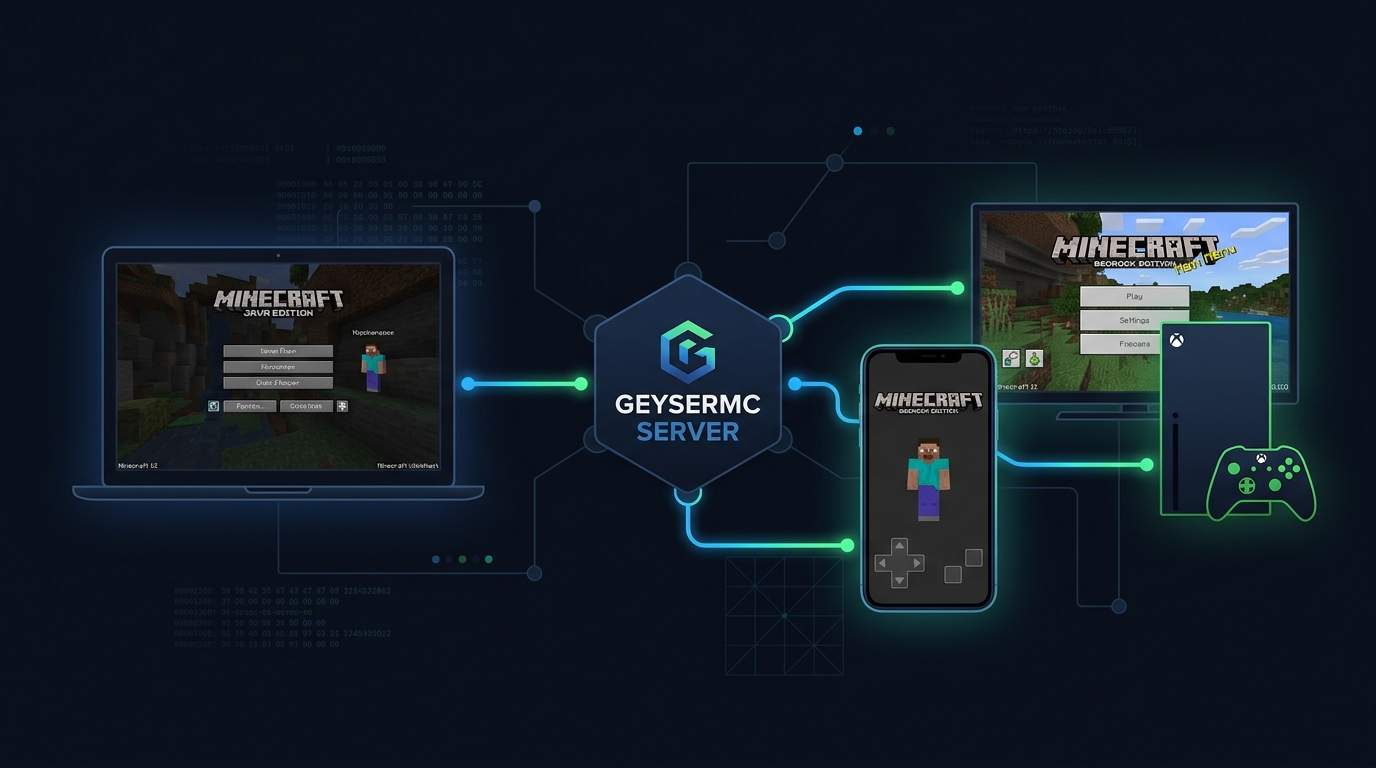
How GeyserMC Crossplay Works
Java Edition and Bedrock Edition use completely different network protocols. They cannot communicate with each other natively — a Bedrock client cannot connect to a Java server and vice versa.
GeyserMC solves this as a protocol translation proxy. When a Bedrock player connects to your server's IP, they're actually connecting to the GeyserMC proxy running on your server. GeyserMC receives Bedrock packets, translates them to Java packets, and sends them to the actual Minecraft Java server — and does the same in reverse for outgoing packets.
From the perspective of your Java server: it only ever sees Java Edition clients. GeyserMC handles all the translation transparently.
What is Floodgate?
Without Floodgate, Bedrock players connecting through GeyserMC would still need to authenticate with a Java Edition account (bought separately). Floodgate removes this requirement.
Floodgate is a plugin that works alongside GeyserMC to allow Bedrock players to authenticate using their Xbox/Microsoft account (Bedrock account) instead of requiring a Java account. Bedrock players' usernames are prefixed with a period (.) to distinguish them from Java players in the server's player list and permission systems.
On Azion Cloud: GeyserMC and Floodgate are pre-installed and pre-configured on all Minecraft plans. Bedrock players can connect immediately on port 19132 — no manual setup required. The key.pem sharing between Floodgate and GeyserMC is handled automatically.
Supported Bedrock Devices
| Platform | Bedrock Version | GeyserMC Support | Connection IP Format |
|---|---|---|---|
| Android (Mobile) | Bedrock 1.20+ | Full | IP:19132 (external server) |
| iOS (iPhone/iPad) | Bedrock 1.20+ | Full | IP:19132 (external server) |
| Xbox One / Series X/S | Bedrock 1.20+ | Full | Requires BedrockTogether workaround |
| PlayStation 4 / 5 | Bedrock 1.20+ | Full | Requires BedrockTogether workaround |
| Nintendo Switch | Bedrock 1.20+ | Full | Requires BedrockTogether workaround |
| Windows 10/11 (Bedrock) | Bedrock 1.20+ | Full | IP:19132 direct connection |
| Windows 10/11 (Java) | Java 1.20+ | Native | IP:25565 (standard) |
Console players (Xbox, PlayStation, Switch) cannot add external servers directly from the server list — they require the BedrockTogether or Bedrock-Lan-Proxy workaround to make the server appear as a LAN game. This is a Minecraft console limitation, not a GeyserMC limitation.
Manual Setup Guide (Paper/Purpur Servers)
Download GeyserMC and Floodgate
Go to geysermc.org/download. Download GeyserMC-Spigot.jar (for Paper/Purpur/Spigot) and Floodgate-Spigot.jar. Always use the latest build.
Install both plugins
Upload both JAR files to your server's /plugins/ directory via SFTP or the Pterodactyl file manager. Do not start the server yet.
Start the server once to generate configs
Start the server. GeyserMC creates /plugins/Geyser-Spigot/config.yml and Floodgate creates /plugins/floodgate/config.yml and a key.pem file. Stop the server.
Copy the Floodgate key to GeyserMC
Copy /plugins/floodgate/key.pem to /plugins/Geyser-Spigot/key.pem. This allows GeyserMC to verify Floodgate's authentication tokens.
Configure the Bedrock port
In /plugins/Geyser-Spigot/config.yml, confirm bedrock.port: 19132. Open UDP port 19132 in your server's firewall alongside TCP 25565.
Restart and test
Restart the server. Java players connect to yourip:25565 as normal. Bedrock/Mobile players connect to yourip:19132 from the "External Servers" option in Minecraft Bedrock.
Key GeyserMC Configuration Options
# /plugins/Geyser-Spigot/config.yml (key settings)
bedrock:
  port: 19132          # UDP port for Bedrock connections
  motd1: "My Server"   # Bedrock server list title
  motd2: "GeyserMC"    # Bedrock server list subtitle

remote:
  address: auto        # connects to the Java server automatically
  port: 25565

floodgate-key-file: key.pem   # path to Floodgate's key (required)

# Username prefix for Bedrock players (visible in /list, permissions, etc.)
# Default: "." (dot) — e.g., ".Abhijot" for Bedrock player "Abhijot"
Plugin Compatibility with Bedrock Players
| Plugin Type | Works for Bedrock? | Notes |
|---|---|---|
| Economy (Vault, EssentialsX) | Full | Commands, balances, shops work normally |
| Permissions (LuckPerms) | Full | Bedrock username includes dot prefix |
| Protection (WorldGuard) | Full | Flags and regions apply to Bedrock players |
| Anti-Cheat | Partial | Some Java-specific movement checks need whitelist for Bedrock |
| Custom Inventory GUIs | Partial | Standard chests work; book GUIs may not render on Bedrock |
| Chat Plugins | Full | Messages appear correctly; Bedrock has different chat UI |
| Minigame Plugins | Partial | Depends on plugin; most work, complex UI may break |
Anti-cheat configuration: Popular anti-cheat plugins (Grim, Vulcan, Matrix) may flag Bedrock players for movement violations because Bedrock's physics differ from Java. Add your server's GeyserMC connection IP (127.0.0.1 in plugin mode) to the anti-cheat whitelist, or enable the GeyserMC-specific anti-cheat compatibility settings in the plugin.
Why GeyserMC Matters for Indian Minecraft Servers
In India, a significant portion of Minecraft's player base plays on Bedrock Edition via Mobile (Android/iOS) — either because mobile is their primary gaming platform or because they use the free trial version. Without GeyserMC, these players cannot join Java servers.
For Indian Minecraft server owners, GeyserMC crossplay can double the accessible player pool by including mobile players who would otherwise be excluded. Public Indian SMP servers that enable GeyserMC consistently report higher player counts than Java-only equivalents.
FAQ
GeyserMC is an open-source proxy plugin that translates the Minecraft Bedrock Edition network protocol into Java Edition protocol. This allows Bedrock clients — Mobile, Xbox, PlayStation, Nintendo Switch, Windows Bedrock — to connect to a Java Edition Minecraft server without any modification to either the Java server or the Bedrock client.
No. With Floodgate installed alongside GeyserMC, Bedrock players authenticate using their Xbox/Microsoft account (Bedrock account). They do not need to own or purchase Java Edition. This is the key advantage of Floodgate — it removes the Java account requirement for Bedrock players.
Yes, with GeyserMC and Floodgate installed on the Java server. Android and iOS players open Minecraft Bedrock Edition, go to Servers, then Other Servers, and add the server's IP and port 19132. They can then join and play on the Java server alongside PC Java players, with full access to the world, economy, and most plugins.
GeyserMC adds a small amount of CPU overhead for protocol translation — typically 1-3% additional CPU usage per concurrent Bedrock player. On modern hardware (Ryzen 9, Intel Xeon Platinum), this is negligible and does not cause measurable TPS drops for most Indian server configurations.
GeyserMC uses UDP port 19132 by default — the standard Minecraft Bedrock Edition port. Java Edition uses TCP port 25565. Both ports must be open on your server's firewall. On Azion Cloud, both ports are automatically configured and open for all Minecraft plans.
GeyserMC Included Free on All Azion Cloud Minecraft Plans
All Azion Cloud Minecraft hosting plans come with GeyserMC and Floodgate pre-installed on port 19132. Mobile, Xbox, and Java players can join from day one — no setup required.
View Minecraft Hosting Plans →Related: Minecraft TPS Guide • PaperMC vs Purpur vs Spigot • Geyser & Floodgate Setup • Full Minecraft Server Setup Guide